In short
To learn how to make TikTok carousels, start with one rule: pick one idea, split it into 5 to 8 vertical images that each carry one point, put the hook on the first slide, and upload the images in order through the Photo option in the TikTok app. You don't need to film anything,.
The part that decides whether people swipe is the plan, not the upload. This guide gives a seven-slide template, a rule for choosing slides or video, and the checks to run before you post.
- Use a carousel when the idea works as a list, a checklist or a step-by-step. Use video when the idea needs a voice, motion or a story.
- Slide 1 does the work of a hook. Put the promise in a few words, big and centred.
- One idea per slide, and no more than about 12 words of text on any of them.
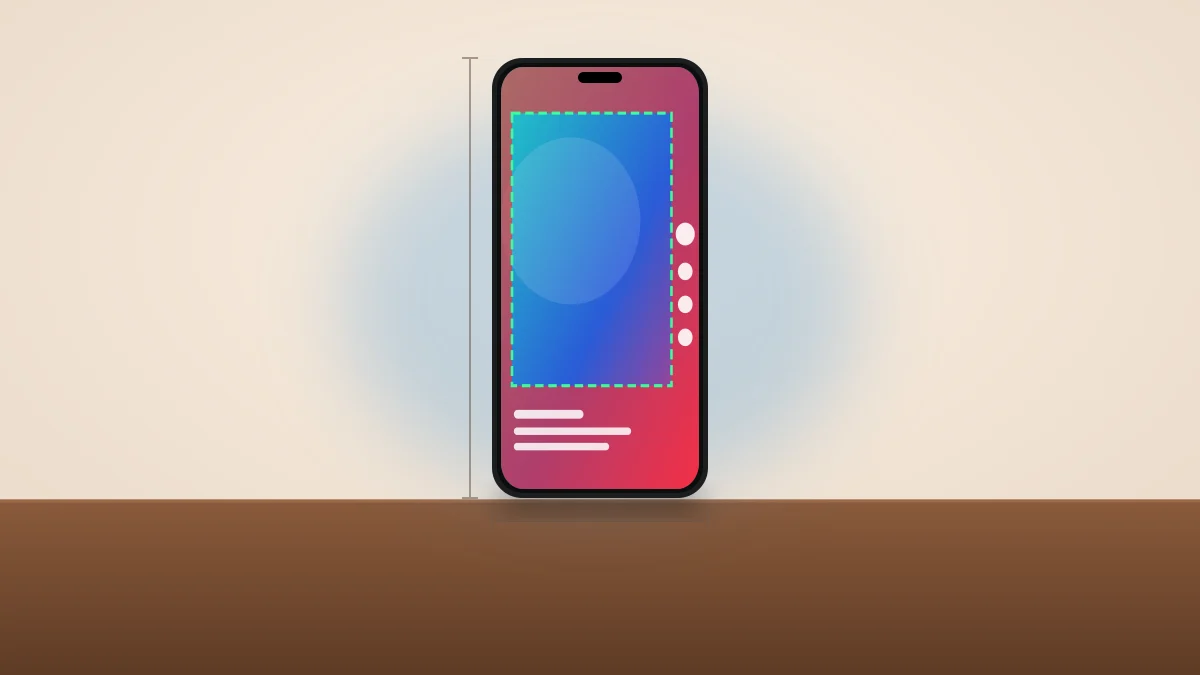
- Make every slide 1080 × 1920 pixels and keep text inside the safe zone, so TikTok's buttons don't cover it.
- Check TikTok's own help text for the current photo limit before you plan a long carousel. Third-party posting tools document up to 35 photos per post.
3 days of Lite, 100 credits. Card required, cancel anytime
When should you make a carousel instead of a video?
Choose a carousel when the viewer benefits from setting their own pace. Lists, checklists, recipes, comparisons and "save this for later" content all read well as slides, because people can stop on a slide, screenshot it, or swipe back. Choose video when the point depends on a voice, on movement, or on a story that builds over time.
| Your idea | Better as | Why |
|---|---|---|
| "5 mistakes beginners make" | Carousel | Each mistake gets one slide |
| A weekly checklist or template | Carousel | People want to save and reuse it |
| A step-by-step with a clear order | Carousel | Swiping matches the order of the steps |
| A story with a twist at the end | Video | Pacing and voice carry the reveal |
| A demo of something that moves | Video | Photos can't show motion |
| A claim you need to explain aloud | Video | Narration holds attention better than text |
We don't have a reliable figure for how carousel reach compares with video, and the numbers floating around are mostly from tool vendors. Treat the format as a different tool, not a growth trick. If you want to compare formats across platforms, our guide on TikTok vs Reels vs Shorts covers where each one fits.
What is the best structure for a TikTok carousel?
The structure that works for most topics is seven slides: a hook, a promise, four content slides and a closing slide. Each content slide carries one point in a short headline and a photo that supports it. The last slide tells the viewer what to do next, such as saving the post or following for part two.
Here is the template, with a made-up example for a plant-care account:
| Slide | Job | Example text |
|---|---|---|
| 1 | Hook | "Your basil is dying. Here's why." |
| 2 | Promise | "4 mistakes, and the fix for each" |
| 3 | Point one | "1. Watering on a schedule" |
| 4 | Point two | "2. A pot with no drainage" |
| 5 | Point three | "3. Too little light" |
| 6 | Point four | "4. Wet leaves overnight" |
| 7 | Next step | "Save this for your next plant" |
This is an example, not a result we measured. The point is the shape: a reason to swipe, a promise of how far to go, then steady payoff. Slides 3 to 6 can be longer or shorter, but every extra slide has to earn its place, because each swipe is a chance to leave.
How do you write slide 1?
Slide 1 is the cover and the hook in one. State the topic and the payoff in as few words as you can, in large type, over a photo that doesn't compete with the words. Our TikTok hook generator can draft options, and the viral hook examples show patterns that translate to a cover line.
Don't use a slide-1 promise the rest of the carousel can't keep. A hook that overpromises gets the swipe once, and nobody comes back for the next post.
How to make TikTok carousels step by step
Plan on roughly 20 minutes with a phone or a browser, and no filming.
- Pick one topic and a reader. Write a single sentence: "This is for X who want Y." If it needs two sentences, split it into two carousels.
- Write the slide text first. Draft the seven headlines in a note before you touch any images. If a slide needs more than about 12 words, split it or cut it.
- Find an image for each slide. Use your own photos, or search royalty-free photos. Pick images with calm areas where the text can sit.
- Build the slides. Add one headline per slide at 1080 × 1920 pixels. Our free TikTok carousel generator does this in the browser: search photos, add a headline per slide, preview on a phone mockup and download the slides. It lets you add up to 10 slides per carousel.
- Check the safe zone. Open each slide in the TikTok safe zone checker to confirm the caption, username and buttons don't cover your text.
- Upload in order. In the TikTok app, tap the plus button, choose Photo, then Upload, and select the slides in the order you want them shown.
- Add a sound, then the caption. Pick a sound that fits the topic, write a caption that names the topic in the first line, and finish with a few relevant hashtags.
TikTok's own newsroom described this flow years ago: select your photos in order, then add filters, voiceover, sounds and text. That post dates from 2020, so menu names have changed, and we couldn't open TikTok's current help page in this run. Use it as a description of the idea and follow what the app shows today.
What size should TikTok carousel slides be?
Make every slide 1080 × 1920 pixels, which is the 9:16 vertical format. Square or horizontal photos get cropped or shown with bars, which wastes the screen and shrinks your text. We list the full set of sizes in our guide to TikTok dimensions.
Text placement matters as much as size. TikTok draws the caption and username along the bottom and a column of buttons on the right, so keep headlines in the middle band of the frame. Leave about the top tenth and the bottom quarter empty of anything you need people to read.
How many slides can a TikTok carousel have?
The number has changed over time, and sources disagree on the minimum. One scheduling tool's help page says you can upload up to 35 photos in a carousel post and that photos can't be mixed with GIFs or videos. We couldn't verify that against TikTok's own help text, so check the upload screen in your app before you plan a long post.
For most topics, 5 to 8 slides is plenty. A list of ten tips doesn't need ten slides if four of them say the same thing. Cut to the points that are different from each other.
What mistakes cost the most swipes?
Four mistakes show up again and again in carousels.
- A paragraph on a slide. If it can't be read in two seconds, it won't be read.
- Low-contrast text. White text on a bright photo disappears. Add a dark overlay or pick a calmer image.
- A different look on every slide. Pick one font, one text position and one color accent, and repeat them.
- No reason to reach the end. Tease the best point on slide 2, such as "number 4 is the one most people miss," and keep that promise.
One more habit helps: after you build the slides, scroll through them quickly on your phone at normal speed. If a slide takes more than a couple of seconds to understand, simplify it.
When is a video the better choice?
If your idea needs narration, such as a story, a demo or an opinion you need to explain, make a video. A voiced short can carry more nuance than slides, and you can still make it without showing your face.
Viibeo makes those: you give it a topic, and it writes the script, records the voice, picks visuals and adds captions. New accounts start with a 3-day Lite trial for €1, and 100 credits, about 2 or 3 videos, with clean exports. Viibeo publishes this page and sells a video product, so we have a stake in you trying it; for slide-only posts, the free carousel tool above is enough, and Viibeo doesn't make photo carousels itself.
A simple way to use both: turn each carousel that gets saved or shared into a short video with a voiceover, and reuse the same slide text as the script. Our faceless script generator can turn a topic into narration. For more on making these, see our guide to making faceless TikTok videos with AI.
Frequently Asked Questions
How do you make a carousel on TikTok?
Plan 5 to 8 vertical slides with one point each, then open the TikTok app, tap the plus button, choose Photo and Upload, and select your images in order. Add a sound and a caption, then post. You can build the slides beforehand in a browser tool.
How many photos can you put in a TikTok carousel?
One scheduling tool documents up to 35 photos per post, but the limit has changed before and we couldn't confirm the current figure from TikTok itself. Check the upload screen in your app. Most carousels work well at 5 to 8 slides.
What size should a TikTok carousel image be?
Use 1080 × 1920 pixels, a 9:16 vertical image. Keep headlines in the middle of the frame so the caption and buttons don't cover them. Our TikTok dimensions guide has the full spec.
Do TikTok carousels get more views than videos?
We found no reliable, independent figure, so we won't quote one. Results depend on your niche and the quality of the post. Choose the format that fits the idea: slides for lists and steps, video for stories and demos.
Can you make a TikTok carousel without showing your face?
Yes. A carousel is made of photos and text, so no one has to appear on camera. Use your own photos or royalty-free images, and put the message in the headlines.
Should you add hashtags to a carousel?
Yes, a few relevant ones at the end of a caption that names the topic first. Our guide on how to choose TikTok hashtags explains how many to use and what to avoid.
Written by

Audiencon
Founder of Viibeo
Builds Viibeo and writes this journal from the product: faceless shorts with script, voice, captions, and auto-post.